Contact Us  |  Get Support
Find Net Solutions Gold Coast Website Design and SEO
  • Home

    • About Us
    • 7 Costly Mistakes Business Owners Make Online
    • Clients Websites

  • Services

    • Get a FREE Holiday
    • Digital Marketing Solutions
    • Want an Easy Online Business?
    • Genesis Marketing Training Library
    • Australian Web Hosting
    • Domain Name Registration
    • Email & Microsoft Office Apps

  • 1st on Google
    • Search Engine Optimisation
    • SEO Rescue Program
    • Google AdWords

  • Web Solutions

    • Aussie Do It Yourself Websites
    • Ezy Drop Shipping Limited Discount
    • High Ticket Affiliate Marketing
    • Landing and Sales Pages
    • Smart Websites
    • Pay As You Go Websites
    • Smart eCommerce Websites

  • Contact
    • FAQs
    • Digital Marketing News Articles
    • FREE Website User Experience Audit
    • Strategy Session
    • Support Ticket
    • Clients Help Articles

  • Blog
  • Menu Menu

What is Website Design UI or User Interaction
Smart Business, Website Tips
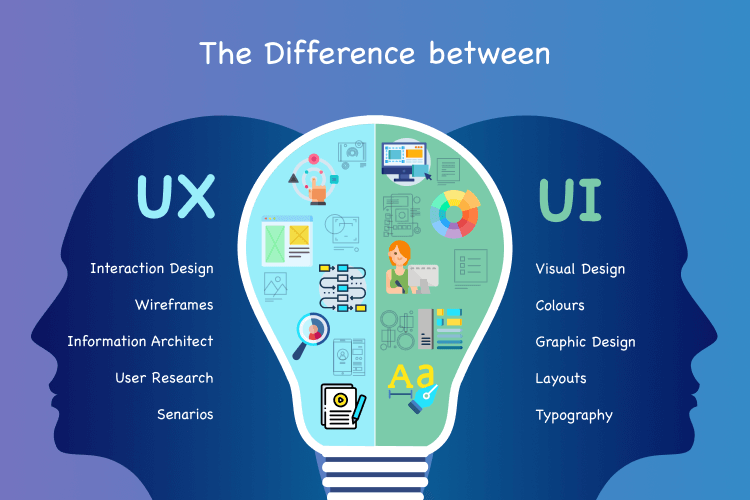
UX and UI Design

Features that make up Website Design UI (User Interface)

Website design UI (User Interface) focuses on the visual and interactive elements of a website that users directly interact with.

Here are key features that contribute to an effective UI design:

  1. Visual Consistency:

    • Consistent use of colours, fonts, and design elements across the site.
    • Uniformity in the presentation of buttons, icons, and other visual components.
  2. Responsive Design:

    • Ensuring that the user interface adapts seamlessly to different screen sizes and devices.
    • Prioritizing touch-friendly elements for mobile devices.
  3. Intuitive Navigation:

    • Clearly labelled and easily accessible navigation menus.
    • Logical grouping of menu items for a user-friendly experience.
  4. Interactive Elements:

    • Engaging buttons, sliders, checkboxes, and other interactive components.
    • Use of hover effects, animations, and transitions to enhance interactivity.
  5. Typography:

    • Legible and visually appealing font choices.
    • Proper hierarchy with headings, subheadings, and body text.
  6. Whitespace (Negative Space):

    • Thoughtful use of whitespace to improve readability and visual clarity.
    • Avoidance of clutter to create a clean and organized appearance.
  7. Images and Icons:

    • High-quality and relevant images that complement the content.
    • Consistent use of icons for intuitive communication.
  8. Grid Layouts:

    • Structured grid systems for consistent alignment and organization.
    • Aesthetic appeal through well-balanced layouts.
  9. Feedback Elements:

    • Visual cues for user actions (e.g., button presses, form submissions).
    • Error messages and feedback for user interactions.
  10. Form Design:

    • Clear and user-friendly form layouts with proper labelling.
    • Input fields, checkboxes, and radio buttons are designed for ease of use.
  11. Call-to-Action (CTA) Buttons:

    • Visually striking CTA buttons with clear and concise text.
    • Use contrasting colours to make buttons stand out.
  12. Loading Animations and Indicators:

    • Informative loading animations to manage user expectations.
    • Progress indicators for actions that take time to complete.
  13. Consistent Iconography:

    • Uniform use of icons for a cohesive visual language.
    • Icons that are easily recognizable and convey their intended meaning.
  14. Colour Scheme:

    • Thoughtful colour choices that align with branding and evoke the desired emotions.
    • Attention to colour contrast for readability and accessibility.
  15. Microinteractions:

    • Small, subtle animations or changes in response to user actions.
    • Enhances the overall user experience by providing feedback.
  16. Feedback and Help:

    • Easily accessible help or support features.
    • User-friendly error messages and guidance on resolving issues.
  17. User Onboarding:

    • Smooth and guided onboarding processes for new users.
    • Intuitive tutorials or tooltips to help users understand the interface.

By incorporating these UI features, designers can create visually appealing and user-friendly interfaces that enhance the overall user experience and encourage interaction with the website.

Recommend you also read the Article on UX or User Experience in Website Design – https://findnetsolutions.com/what-is-website-design-ux-or-user-experience/




Share this entry
  • Share on Facebook
  • Share on X
  • Share on WhatsApp
  • Share on Pinterest
  • Share on LinkedIn
  • Share by Mail
Refer a Friend and be Rewarded
Search Search

Recent Articles including Your Key Advisors Tips

  • Why AI-Generated Websites Are NOT for Serious Businesses
  • Why Every Website Now Needs an AI SEO Upgrade
  • AI Optimisation Checklist for Your Website
  • Future-Proof Your Business With Smart AI & SEO Website Design
  • 5 Reasons to Upgrade to a Smart AI & SEO Website Design
  • How AI is Changing Search — And Why Your Website Must Adapt
  • Why Smart AI & SEO Website Design is Essential for Businesses
  • What is the Difference Between AEO and SEO?
Gold Coast Web Design and Digital Marketing by Find Net Solutions place picture
Gold Coast Web Design and Digital Marketing by Find Net Solutions
4.8
Based on 58 reviews
powered by Google
review us on
How to Pick the Best Online Business eBook

Marketing is Like Air… You Can’t Survive without it!

Genesis Marketing Educational Library
Pay as You Go Websites
Get a Website and Get a Free Holiday

Easy Online Business with 100% Commission

Follow Us

Find Net Solutions – Web Design & Marketing since 2000

Gold Coast Web Design and Digital Marketing by Find Net Solutions place picture
Gold Coast Web Design and Digital Marketing by Find Net Solutions
4.8
Based on 58 reviews
powered by Google
review us on

Helpful & Relevant Links

  • Smart AI & SEO Websites
  • Aussie DIY Websites
  • Pay As You Go Websites
  • Ezy Drop Shipping Online Stores Special Pricing
  • Ezy AI Assistant – NO Fees
  • Get a FREE Holiday
  • Genesis Marketing Training Library
  • Want an Easy Online Business?
  • Domain Name Registration
Refer a Friend and be Rewarded
Search Search

Recent Articles

  • Why AI-Generated Websites Are NOT for Serious Businesses
  • Why Every Website Now Needs an AI SEO Upgrade
  • AI Optimisation Checklist for Your Website
  • Future-Proof Your Business With Smart AI & SEO Website Design
  • 5 Reasons to Upgrade to a Smart AI & SEO Website Design
  • How AI is Changing Search — And Why Your Website Must Adapt
  • Why Smart AI & SEO Website Design is Essential for Businesses
Genesis Marketing Educational Library
How to Pick the Best Online Business eBook

Get a Website and Get a Free Holiday

© Karanda Holdings P/L - Website by Find Net Solutions - effective web solutions
  • Link to LinkedIn
  • Home
  • Digital Marketing Solutions
  • Free Holiday
  • FAQs
  • Support Ticket
  • Contact Us
  • Privacy
  • Terms
Link to: What is Website Design UX or User Experience Link to: What is Website Design UX or User Experience What is Website Design UX or User ExperienceUX Web Design Fundimentals Link to: SEO 2024: Is Your Website Ready for Googles AI SGE Search? Link to: SEO 2024: Is Your Website Ready for Googles AI SGE Search? Google AI SGESEO 2024: Is Your Website Ready for Googles AI SGE Search?
Scroll to top Scroll to top Scroll to top

SEO Booster Starter Pack &
AI SEO Essential Upgrade
Enquiry

SAVE Hundreds of $$$... LIMITED Time OFFER.

You'll see pricing and what's included

Full details are in the Follow Up email, check your Spam.

"*" indicates required fields

This will help use understand your need and thus we'll be able to help you better. Make sure you watch for the follw up email, you may need to check your Junk folder