Why You Should Avoid File Manager Plugins on WordPress Websites
Why WordPress File Manager Plugins Can Be a Security Risk
WordPress plugins can make managing a website much easier, but not every plugin should be installed simply because it is convenient.
One type of plugin we are particularly cautious about is the WordPress File Manager plugin.
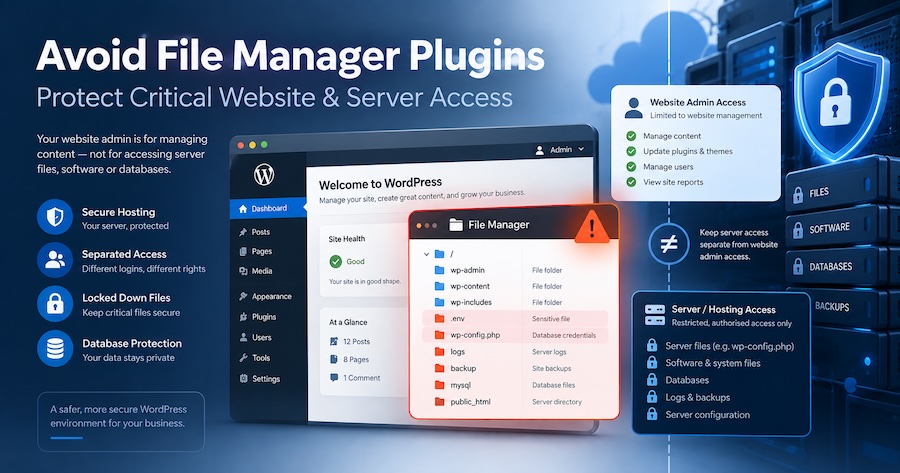
File Manager plugins allow someone logged into WordPress to access files that would normally only be accessible through a secure hosting control panel, SFTP or server administration system.
That convenience can potentially create a major security risk.
Your WordPress Login Should Not Be Your Server Login
One of the basic principles of good website security is keeping different levels of access separate.
A WordPress Administrator should normally be able to manage the website.
A hosting or server administrator may have access to considerably more, including:
- Website files
- WordPress configuration files
- Databases
- Backup files
- Server folders
- Software installations
- Email configuration
- Other websites within the hosting account
These are very different levels of access.
Installing a File Manager inside WordPress can potentially blur that separation.
If someone gains administrator access to the website, a File Manager plugin may give them a much easier path to files and systems that would normally require separate hosting credentials.
One Compromised Login Can Become a Much Bigger Problem
Imagine a hacker discovers or steals a WordPress Administrator password.
Without additional tools, their access may initially be limited to the WordPress administration area.
But if there is a powerful File Manager plugin installed, they may be able to browse website directories, modify important files or upload malicious software.
Depending on the hosting configuration and permissions, the consequences can be much more serious than simply changing a page on the website.
This is why we prefer to keep WordPress administration and server administration separate wherever possible.
Don’t Connect Critical Accounts Unless You Need To
The same principle applies across your online business systems.
Avoid having one login provide unnecessary access to multiple critical services.
Where practical:
- Keep WordPress and hosting passwords separate
- Use different administrator accounts for different people
- Remove accounts that are no longer required
- Use strong unique passwords
- Enable two-factor authentication where available
- Limit administrator access
- Never share one master password between multiple staff members
- Avoid unnecessary plugins that provide server-level access
- Keep your hosting control panel separate from normal website administration
If one password is compromised, you want to limit how far the attacker can go.
Too Many Plugins Can Also Increase Risk
Another issue we regularly see on older WordPress websites is excessive numbers of plugins.
Every plugin adds additional software to your website.
That doesn’t mean plugins are bad. WordPress depends on plugins for many important functions.
The problem is unnecessary, outdated or abandoned plugins.
Each additional plugin can potentially introduce:
- Security vulnerabilities
- Compatibility issues
- Website performance problems
- Software conflicts
- Additional maintenance requirements
If a plugin is no longer needed, it should normally be removed rather than simply deactivated and forgotten.
We Recently Saw How Serious This Can Become
Find Net Solutions recently assisted a client whose website had originally been developed elsewhere before being moved to us.
The website contained a substantial amount of valuable business content, including hundreds of videos, blog articles and training material used by the client’s customers.
A security problem caused serious damage to the website environment and important content became unusable for her clients.
When a website contains years of intellectual property, training material and customer resources, the impact of a security problem goes far beyond repairing a few website pages.
It can disrupt the entire business.
Situations like this reinforce why we are cautious about unnecessary administrator access, powerful File Manager plugins, excessive plugins and poorly separated hosting credentials.
Convenience Should Never Override Security
There may occasionally be legitimate technical reasons for a developer to access website files.
But that does not mean a File Manager needs to permanently sit inside WordPress.
At Find Net Solutions, server-level file access is normally handled through the appropriate secure hosting and server management systems.
This keeps critical infrastructure separate from the everyday WordPress dashboard.
It is a little less convenient.
But when it comes to protecting a valuable business website, that separation is a good thing.
Treat Your Website as a Business Asset
Modern websites often contain far more than a few pages and photos.
They may contain:
- Customer information
- Membership records
- Online courses
- Videos
- Intellectual property
- Ecommerce orders
- Business documents
- Years of blog content
- Marketing systems
- Payment integrations
Protecting that information requires more than installing another security plugin.
It requires sensible access control, professional hosting, regular maintenance, reliable backups and careful management of the software installed on the website.
Find Net Solutions provides Website Care, secure managed hosting and ongoing support for Australian businesses that would prefer someone experienced to take care of the technical side.
If you are concerned about your current website security, the number of plugins installed or who has access to your website and hosting account, contact Find Net Solutions for a website review.
A few minutes spent reviewing website access today can prevent a much bigger problem tomorrow.
You Need this One-Time AI SEO Upgrade?
Our AI SEO Upgrades are recommended for:
- New websites
- Older websites that haven’t ranked well
- Websites not originally built with Smart AI SEO Technology
- Any business wanting stronger results from AI search
Not required for clients with Smart AI & SEO Websites by Find Net Solutions designed after Nov 2025, as these sites are already built with full AI-readiness.
Future-Proof Your Website Today
AI search isn’t coming — it’s already here.
If you want your business to show up when someone asks an AI assistant for your services, you need the right technical setup, clear content, and strong authority signals.
Our AI SEO Upgrade Packages are the fastest, most effective way to improve your visibility across all major AI tools.