Contact Us  |  Get Support
Find Net Solutions Gold Coast Website Design and SEO
  • Home

    • About Us
    • 7 Costly Mistakes Business Owners Make Online
    • Clients Websites

  • Services

    • Get a FREE Holiday
    • Digital Marketing Solutions
    • Want an Easy Online Business?
    • Genesis Marketing Training Library
    • Australian Web Hosting
    • Domain Name Registration
    • Email & Microsoft Office Apps

  • 1st on Google
    • Search Engine Optimisation
    • SEO Rescue Program
    • Google AdWords

  • Web Solutions

    • Aussie Do It Yourself Websites
    • Ezy Drop Shipping Limited Discount
    • High Ticket Affiliate Marketing
    • Landing and Sales Pages
    • Smart Websites
    • Pay As You Go Websites
    • Smart eCommerce Websites

  • Contact
    • FAQs
    • Digital Marketing News Articles
    • FREE Website User Experience Audit
    • Strategy Session
    • Support Ticket
    • Clients Help Articles

  • Blog
  • Menu Menu

Dealing with Bounced and Blocked Emails

including inbound and outbound emails

  • bounced emails

Are Your Outbound Emails and NOT Getting Delivered?

Many businesses are having a big problem with good emails ending up in their Spam folder or being Blocked and not being delivered at all.
Recently Gmail, Bigpond, Microsoft and probably other email clients increased their threshold for treating emails as spam or not spam.

This is a good thing and a bad painful thing in business. As many reputable suppliers and other businesses are now being Blocked and seen as Spam by Gmail and Bigpond. These emails, many are important to a business, yet they are either not delivered like they used to be. Or the emails end up in Gmail or Bigpond spam folders.

The Solution is;

You should use a Dedicated Mail Server, not the Standard Mail Server that is included with most website hosting.

The mail servers our IT Guys recommend is either Google Workspace (formerly G Suite) or Microsoft 365 Exchange for Mail or Microsoft 365 Business Basic (formerly Office 365 Business Essentials). Note: Microsoft 365 Exchange for Emails Business is ONLY email and does NOT include programs like Word, Excel, Outlook etc.

  • Micro Soft Plans
  • Google Workspace (formerly G Suite) Plans

Are Emails to and from your Website Forms and Shop Orders NOT Getting Delivered?

SMTP Authentication is Recommended to improve Email Deliverability

We recommend installing and configuring a SMTP Plugin in your website.

SMTP Plugins are used widely to improve email deliverability for website contact forms or shopping cart email. However, normally they are configured and verified with a particular email address.

Q/ What is SMTP?
A/ Simple Mail Transfer Protocol

Q/ What is SMTP Authentication?
A/ SMTP Authentication is the mechanism by which the clients of an ISP (Internet Service Provider) identify themselves to the mail server through which they intend to send email.

The Result is… SMTP Authentication makes your emails MORE TRUSTED and thus your emails get delivered better.

NOTE: If you change that email address to use a different email address with your website forms or your shopping cart. Then you will probably need to RE Configure the SMTP Plugin with your Mail Server eg Microsoft, Google or the Standard Mail Server that comes with your website hosting.

If you need a hand submit a Support Ticket – https://findnetsolutions.com/support-ticket

Get those Inbound Emails not getting delivered into your inbox?

Adding Addresses to your Allowlist (Whitelist) on Gmail

Gmail offers an option to add specific addresses or domains as “safe” so they aren’t automatically marked as spam. This list is known as an “Allowlist.” Your Allowlists only apply to your Gmail account and must be managed and set by you. If you want to accept all emails sent from a specific address, follow these instructions:

  1. Log in to your Gmail at gmail.com.
  2. Click the gear icon in the top-right, and select Settings.
  3. Click All Settings.
  4. Click the Filters and Blocked Addresses tab.
  5. Click Create at New Filter.
  6. In the pop-up window, enter the email address you want to add to your allowlist in the From field. If you want a whole domain allowlisted, (whitelist) you can just enter the domain (ie, “@example.com”).
  7. Click Create filter.
  8. Check Never send it to Spam.
  9. Click Create filter.

Click images to enlarge.
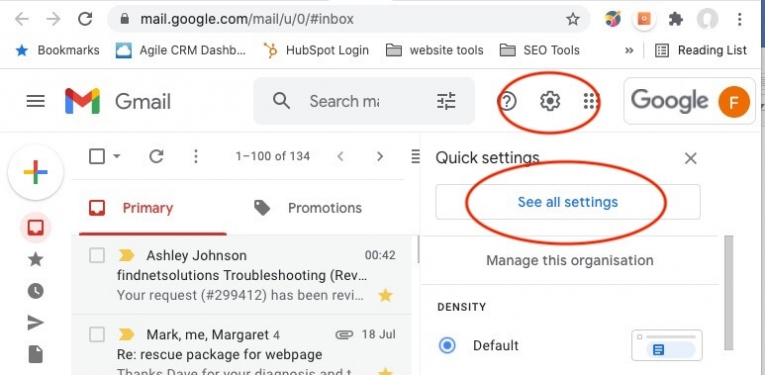
Gmail advanced settings step 1
gmail whitelisting email address step 2
gmail whitelisting email address step 3

Adding Addresses to “Safe Senders” in Office365

Office 365 allows users to designate “Safe Senders.” Safe Senders are not automatically marked as spam. This functionality is available for the Outlook web client and the Outlook Windows client.

It is not available for the MacOS Outlook client.

See this article from ISC for directions:

https://www.isc.upenn.edu/how-to/penno365-configuring-safe-senders-lists

How to Add a Sender to the Safe Senders List in Microsoft Outlook

Add known senders to the Safe Senders list to ensure that their email will not go to your Junk E-mail folder.
This feature works the same in all modern versions of Microsoft Outlook: 2010, 2013, and 2016.
https://www.webucator.com/how-to/how-add-sender-the-safe-senders-list-microsoft-outlook.cfm

Create Rules in Microsoft Outlook to Move Email Into Specified Folder

If you want to organise your Microsoft Outlook inbox then this video is for you. I will show you how to manage email messages by using rules. This works in Microsoft Outlook 2007, Microsoft Outlook 2010, Microsoft Outlook 2013, Microsoft Outlook 2016 and Office 365.
So if your inbox is full of email and is really hard to find what you’re looking for then organising it to Specified Folder is the way to go. you can set it up how you like incoming and outgoing folders and set rule for all email accounts.

Follow a manual added link

How do I add a contact to my Telstra email?

This video and article explains how to add new contacts to your Telstra address book, how to recover a deleted contact and how to add a contact’s phone number.
To add a new contact:

  • Select Contacts
  • Select Add Contact
  • Enter the contact’s details
  • Select Save

This Support page from Telstra has other helpful videos for Telstra Mail.
https://www.telstra.com.au/support/category/email/how-to/how-to-use-the-contacts-features-of-telstra-mail


Refer a Friend and be Rewarded
Search Search

Recent Articles including Your Key Advisors Tips

  • Why AI-Generated Websites Are NOT for Serious Businesses
  • Why Every Website Now Needs an AI SEO Upgrade
  • AI Optimisation Checklist for Your Website
  • Future-Proof Your Business With Smart AI & SEO Website Design
  • 5 Reasons to Upgrade to a Smart AI & SEO Website Design
  • How AI is Changing Search — And Why Your Website Must Adapt
  • Why Smart AI & SEO Website Design is Essential for Businesses
  • What is the Difference Between AEO and SEO?
Gold Coast Web Design and Digital Marketing by Find Net Solutions place picture
Gold Coast Web Design and Digital Marketing by Find Net Solutions
4.8
Based on 58 reviews
powered by Google
review us on
How to Pick the Best Online Business eBook

Marketing is Like Air… You Can’t Survive without it!

Genesis Marketing Educational Library
Pay as You Go Websites
Get a Website and Get a Free Holiday

Easy Online Business with 100% Commission

Follow Us

Find Net Solutions – Web Design & Marketing since 2000

Gold Coast Web Design and Digital Marketing by Find Net Solutions place picture
Gold Coast Web Design and Digital Marketing by Find Net Solutions
4.8
Based on 58 reviews
powered by Google
review us on

Helpful & Relevant Links

  • Smart AI & SEO Websites
  • Aussie DIY Websites
  • Pay As You Go Websites
  • Ezy Drop Shipping Online Stores Special Pricing
  • Ezy AI Assistant – NO Fees
  • Get a FREE Holiday
  • Genesis Marketing Training Library
  • Want an Easy Online Business?
  • Domain Name Registration
Refer a Friend and be Rewarded
Search Search

Recent Articles

  • Why AI-Generated Websites Are NOT for Serious Businesses
  • Why Every Website Now Needs an AI SEO Upgrade
  • AI Optimisation Checklist for Your Website
  • Future-Proof Your Business With Smart AI & SEO Website Design
  • 5 Reasons to Upgrade to a Smart AI & SEO Website Design
  • How AI is Changing Search — And Why Your Website Must Adapt
  • Why Smart AI & SEO Website Design is Essential for Businesses
Genesis Marketing Educational Library
How to Pick the Best Online Business eBook

Get a Website and Get a Free Holiday

© Karanda Holdings P/L - Website by Find Net Solutions - effective web solutions
  • Link to LinkedIn
  • Home
  • Digital Marketing Solutions
  • Free Holiday
  • FAQs
  • Support Ticket
  • Contact Us
  • Privacy
  • Terms
Link to: Find Net Solutions named as Business Excellence Award Finalist 2021 Link to: Find Net Solutions named as Business Excellence Award Finalist 2021 Find Net Solutions named as Business Excellence Award Finalist 2021Finalist Business Excellence Awards 2021 Link to: Website Security and Monitoring Link to: Website Security and Monitoring Data Security imageWebsite Security and Monitoring
Scroll to top Scroll to top Scroll to top

SEO Booster Starter Pack &
AI SEO Essential Upgrade
Enquiry

SAVE Hundreds of $$$... LIMITED Time OFFER.

You'll see pricing and what's included

Full details are in the Follow Up email, check your Spam.

"*" indicates required fields

This will help use understand your need and thus we'll be able to help you better. Make sure you watch for the follw up email, you may need to check your Junk folder